
Pinterest Analytics Explained: The Metrics Bloggers Should Actually Understand
Introduction
Pinterest Analytics can look more complicated than it needs to be.
Open the dashboard for the first time and you may see impressions, saves, Pin clicks, outbound clicks, engagement rates, audience numbers, graphs, filters, and top-performing Pins.
The temptation is to ask:
Which number should be going up?
A better question is:
What am I trying to learn?
For a blogger using Pinterest to attract readers to a website, analytics should help answer practical questions:
Which topics are getting discovered?
Which Pins are encouraging people to explore further?
Which Pins are sending visitors to the website?
Are certain topics, designs, or messages worth testing again?
Is the overall strategy creating the kind of activity you actually want?
Pinterest describes Analytics as a way to understand your overall presence and identify which organic and paid content resonates with people. The Analytics Overview includes overall performance, performance over time, top boards, top Pins, metrics, and filters.
You do not need to become a data analyst to use it.
You need to understand what each metric tells you—and what it does not tell you.
What Is Pinterest Analytics?
Pinterest Analytics is Pinterest’s reporting system for business accounts.
It provides information about how your content is being seen and how people interact with it. Pinterest currently includes metrics such as impressions, engagements, saves, Pin clicks, outbound clicks, various rates, audience metrics, and additional metrics for formats such as video.
Pinterest also provides individual Pin stats, which allow you to examine the performance of a particular Pin rather than your account as a whole.
Think of the difference like this:
Pinterest Analytics → What is happening across my Pinterest presence?
Pin Stats → What is happening with this particular Pin?
Both can be useful.
But neither tells you automatically why something happened.
That part requires interpretation.
Start With Your Goal Before Looking at the Numbers
This is perhaps the most important principle in this entire guide.
A metric only becomes meaningful in relation to an objective.
Suppose your primary goal is:
getting relevant readers from Pinterest to your blog.
In that case, outbound clicks deserve considerable attention.
But another creator might be focused on brand awareness, product discovery, video consumption, or building an audience on Pinterest itself.
The same metric will not carry the same importance for every objective.
For Realistic Side Income, our Pinterest system is primarily:
Useful Blog Content → Relevant Pin → Pinterest Discovery → Website Visit
That means we care about discovery.
But we also care about what happens after discovery.
Keep that objective in mind as we look at the individual metrics.
Impressions: Was Your Pin on Screen?
Pinterest currently defines impressions as the number of times your Pins or ads were on screen.
That makes impressions a useful measure of visibility.
If impressions increase, your content is appearing on screen more often.
But be careful about what you conclude from that.
High impressions do not automatically mean:
- people liked the Pin,
- the keyword strategy is perfect,
- people visited your website,
- the Pin reached exactly the right audience,
- or the Pin is commercially successful.
Impressions answer a narrower question:
Was the content being shown?
That is useful information—but it is the beginning of the story, not the end.
If a Pin receives impressions but little further activity, you now have something to investigate.
Maybe the topic is visible but the message is unclear.
Perhaps the visual does not communicate the value quickly enough.
Maybe people are interested in the idea but not in visiting the destination.
Or perhaps you simply do not have enough evidence yet.
Analytics should generate questions, not instant conclusions.
If discovery itself is unclear, How Pinterest Works in 2026 explains the different ways people can encounter Pins.
Saves: Did Someone Want to Keep the Pin?
Pinterest defines saves as the number of times people saved your Pin to a board.
A save can therefore tell you that someone considered the Pin worth keeping.
That is useful.
But the old version of this article went too far by suggesting that Pins with many saves often continue performing for months or gain additional visibility.
We cannot infer that outcome from the save count alone.
A person may save something for later.
They may return to it.
They may never look at it again.
The important point is simply:
A save is a different behavior from a website visit.
That distinction becomes especially important when your business objective is blog traffic.
Pin Clicks: Did Someone Want to See More of the Pin?
Pinterest Analytics includes Pin clicks as another core metric.
Pinterest currently defines Pin clicks as clicks on a Pin or ad that open it in close-up.
That is different from leaving Pinterest.
A Pin can therefore generate interest within Pinterest without necessarily sending the person to your website.
This distinction is easy for beginners to miss:
Impression → Pin Click → Outbound Click
These are not interchangeable actions.
Each represents a different point in the journey.
Outbound Clicks: Did the Pin Lead Someone Off Pinterest?
For bloggers, this is one of the most useful distinctions in the dashboard.
Pinterest defines outbound clicks as actions that lead people to a destination outside Pinterest. Pinterest also provides an outbound click rate, calculated using outbound clicks to the destination URL relative to impressions.
If your objective is website traffic, outbound clicks deserve particular attention because they are closely aligned with that goal.
An outbound click may lead someone to:
- a blog article,
- a landing page,
- a resource,
- an email signup opportunity,
- or another destination you control.
But even here, we should avoid saying:
“Outbound clicks are always the most important Pinterest metric.”
They are especially relevant when your objective is sending people to an external destination.
That is a much more accurate statement.
And remember: the click is not the final business result.
A person still needs to find value after arriving.
The larger journey is:
Discovery → Interest → Outbound Click → Website Experience → Next Action
Engagements and Engagement Rate
Pinterest currently defines engagements as the total number of interactions with Pins, including actions such as saves, Pin clicks, outbound clicks, carousel card swipes, and some collection-related clicks. Engagement rate compares engagements with the number of times Pins were seen.
This can be useful for understanding whether visibility is accompanied by interaction.
But avoid treating engagement rate as a quality score.
A high engagement rate does not automatically prove:
“My design is excellent.”
Likewise, a lower rate does not automatically tell you:
“My headline is bad.”
Several things may be influencing the result.
Instead, use engagement metrics to identify something worth investigating.
For example:
This Pin received considerably more interaction than my other Pins. What is different about it?
That question is useful.
Pinterest likes this font.
That conclusion probably is not.
Rates Can Add Context to Raw Numbers
Pinterest currently provides several rate metrics, including:
- engagement rate,
- save rate,
- Pin click rate,
- outbound click rate.
These can be helpful because raw totals are influenced by how often a Pin was shown.
Imagine two Pins.
One gets far more outbound clicks than another—but it also receives far more impressions.
Looking at both the raw clicks and the rate can give you additional context.
Neither number should be interpreted in isolation.
This leads to a useful rule:
Counts tell you what happened. Rates can help put what happened into context.
Top Pins: Don’t Ask Only “Which Pin Won?”
Pinterest Analytics allows you to view Top Pins and sort them using metrics such as impressions, engagements, Pin clicks, outbound clicks, and saves.
That makes Top Pins extremely useful—but only if you choose the metric that matches the question.
If your goal is website traffic, sorting by impressions alone may not show you the Pins that sent the most people to your site.
Try looking at top Pins by outbound clicks.
Then investigate them.
What topic did the Pin cover?
What promise did the headline make?
Which article did it lead to?
Was the audience angle different?
Was the visual unusually clear?
Did seasonality potentially play a role?
The important word here is investigate.
Your analytics can reveal patterns.
They cannot automatically prove what caused them.
One Successful Pin Is Not a Formula
Suppose your best Pin has:
- a green background,
- a numbered headline,
- a photograph of a laptop,
- and a beginner-focused topic.
It would be tempting to conclude:
“Green Pins with numbered headlines perform best.”
But you have changed several variables at once.
Perhaps the topic mattered most.
Maybe the headline was particularly relevant.
Perhaps timing contributed.
Maybe the destination article was simply more attractive to your audience.
Or perhaps the Pin had more opportunities to be seen.
One result is evidence.
It is not necessarily a formula.
This is why our How to Create Click-Worthy Pins guide treats additional Pin versions as experiments, rather than automatic copies of whatever happened to perform well once.
Use Analytics to Develop Better Questions
Analytics becomes much more useful when you stop asking:
“Is this number good?”
and start asking:
“What does this number suggest I should investigate?”
For example:
High impressions + few outbound clicks
The Pin is being shown, but relatively little external traffic follows. Investigate the promise, visual clarity, audience relevance, and whether the destination feels worth continuing to.
Lower impressions + relatively strong outbound click rate
The Pin may be reaching fewer people, but some of those people are continuing to the website. That could be an interesting topic or message to explore further.
Many saves + fewer outbound clicks
People may consider the idea worth keeping, but the Pin is not producing as much immediate website traffic. Whether that matters depends on your objective.
One topic repeatedly appears among top Pins
That may justify exploring the topic further—but first check whether the pattern persists across multiple Pins and periods.
These are hypotheses.
Not verdicts.
Audience Insights: Learn About the People Behind the Metrics
Pinterest also provides Audience Insights.
According to Pinterest, these insights are based on behavior such as searches and saves and can show interests and demographic information. Current demographic breakdowns can include age, gender, location, and device.
You can examine your total audience and engaged audience, and Pinterest also provides information about interests and affinities.
This can help you ask questions such as:
Are certain topics unusually relevant to my engaged audience?
Does my audience show strong interest in an adjacent subject I have not explored?
What devices are people using?
Pinterest even gives the example that if most impressions come from mobile users, that may be a reason to make sure your website works well on mobile.
That is a good example of analytics leading to an actual business decision.
Filters Matter More Than Beginners Realize
A dashboard total can hide useful information.
Pinterest Analytics currently provides filters that can help you examine performance in more detail. Pin stats can also be filtered by factors such as date range, content type, device, and source where applicable.
This matters because comparing unlike things can lead to poor conclusions.
For example, a video Pin and a static image Pin may have different relevant metrics.
Performance during a seasonal peak may not be directly comparable with an ordinary period.
Mobile and desktop behavior may differ.
Before interpreting a number, ask:
What exactly am I looking at?
Real-Time Numbers Can Change
This belongs prominently in a beginner article because otherwise Pinterest Analytics can be confusing.
Pinterest states that real-time metrics are estimates and subject to change. The numbers may even decrease after you first see them.
So if yesterday’s number does not perfectly match today’s view, that does not necessarily mean something has gone wrong.
It is another reason not to obsess over tiny short-term movements.
Analytics is most useful when it helps reveal meaningful patterns and supports decisions—not when every small fluctuation becomes an event.
Don’t Judge Every Pin on the Same Timeline
The old article says Pinterest growth is slow and advises comparing month-to-month performance.
I would make that more nuanced.
There is no universal amount of time after which every Pin can be declared successful or unsuccessful.
Topics behave differently.
Seasonality differs.
Distribution differs.
Your account and content library change.
Instead of applying a fixed waiting period, compare performance over useful periods and give yourself enough information to distinguish a pattern from noise.
A single day may tell you very little.
But neither does that mean you must wait a prescribed number of months before learning anything.
The goal is not patience for its own sake.
It is enough evidence to make a better decision.
Connect Analytics With Keyword Research
Analytics tells you what happened after publishing.
Keyword research helps you investigate what people may be looking for before publishing.
Together, they create a feedback loop.
Suppose Pinterest Keyword Research reveals an interesting topic.
You create a relevant Pin.
After publishing, analytics tells you whether that content was shown and what actions followed.
That information can influence your next research decision.
The cycle becomes:
Research → Create → Publish → Measure → Learn → Research Again
This is far more useful than collecting keywords once and assuming the job is finished.
Use Analytics to Improve—Not Simply Produce More
Suppose one topic is generating promising outbound traffic.
The answer is not automatically:
Make ten more Pins immediately.
First ask what you have learned.
Is there another genuine audience question within the topic?
Could the existing article be improved?
Would another Pin angle test a useful hypothesis?
Does the topic deserve another article?
Is the result strong enough to justify more attention?
This connects directly with our approach in How Many Pins Should You Create?.
More content should have a reason.
Analytics can help provide that reason.
A Simple Pinterest Analytics Routine
You do not need to check every metric every day.
Instead of prescribing a universal weekly/monthly/quarterly schedule, create a review rhythm that matches how much content you publish and how much useful data you have.
A simple review could look like this:
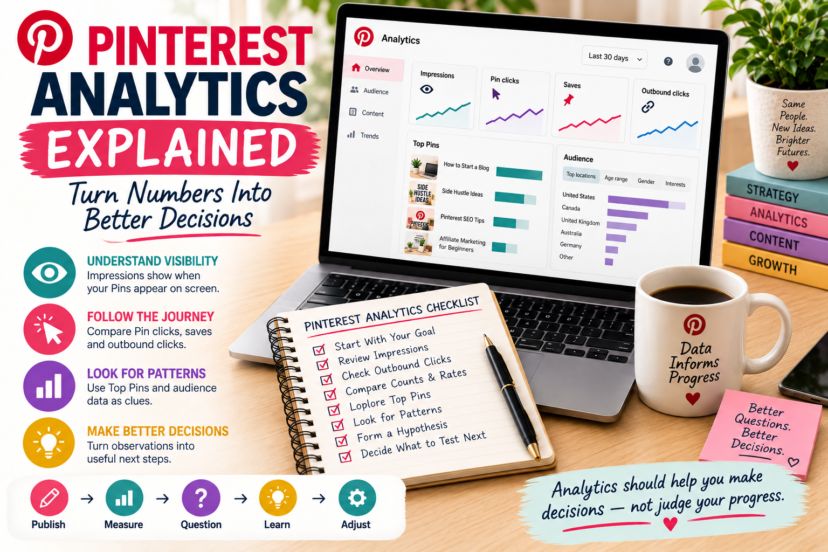
1. Start with your objective.
For RSI, that is primarily relevant website traffic.
2. Look at overall performance.
Are there meaningful changes worth investigating?
3. Check outbound clicks.
Which Pins and topics are actually leading people to the website?
4. Review impressions and interactions for context.
How are people encountering and responding to the content?
5. Examine Top Pins using different metrics.
Do not rank everything by impressions alone.
6. Look for repeated patterns.
One unusual Pin is interesting. Several similar results are more informative.
7. Turn observations into hypotheses.
Decide what you want to test or improve.
8. Make one useful next decision.
That last step is important.
The purpose of analytics is not to finish looking at a dashboard.
It is to make the next decision better.
Common Pinterest Analytics Mistakes
Beginners often make analytics harder than necessary by treating every metric as equally important.
Another common mistake is chasing impressions without considering the actual business goal. A large visibility number can look exciting while telling you little about website traffic.
The opposite problem is dismissing impressions entirely. They still provide useful information about discovery.
Other mistakes include drawing conclusions from a single Pin, assuming correlation proves causation, changing several variables at once and then not knowing what mattered, comparing incompatible periods, and reacting emotionally to short-term fluctuations.
And perhaps the most expensive mistake is this:
collecting data without changing any decisions.
If analytics never influences what you research, create, improve, or stop doing, the dashboard has become entertainment rather than a business tool.
A Better Way to Think About Pinterest Analytics
For a blogger, Pinterest Analytics can be viewed as a sequence:
Impressions → Interaction → Outbound Click → Website
But your actual learning loop is:
Publish → Measure → Question → Learn → Adjust
Those two sequences serve different purposes.
The first helps you understand what users did.
The second helps you decide what you should do next.
For more beginner-friendly Pinterest guides, continue through the Pinterest Marketing Hub.
Final Thoughts
Pinterest Analytics is not a report card.
A number going down does not automatically mean your strategy is failing.
A number going up does not automatically mean you have discovered a winning formula.
Metrics are observations.
Their value comes from the questions they help you ask and the decisions they help you make.
If your goal is blog traffic, pay particular attention to outbound clicks—but use impressions, saves, Pin clicks, rates, Top Pins, and audience information to understand the wider picture.
Then turn that information into action.
Measure what happened. Understand what it may mean. Decide what to test next.
That is what makes Pinterest Analytics useful.
FAQ
1. What is Pinterest Analytics?
Pinterest Analytics is a reporting tool available for Pinterest business accounts. It helps you understand overall performance, Top Pins and boards, audience activity, and metrics such as impressions, saves, Pin clicks, outbound clicks, and engagement.
2. Which Pinterest metric is most important for bloggers?
There is no universally most important metric. If your primary goal is sending people from Pinterest to your website, outbound clicks are particularly relevant because Pinterest defines them as actions leading to a destination outside Pinterest.
3. What is the difference between Pin clicks and outbound clicks?
Pin clicks measure clicks that open or interact with the Pin, while outbound clicks track clicks to the destination URL outside Pinterest. The distinction is important when website traffic is your goal.
4. Why do my Pinterest Analytics numbers sometimes change?
Pinterest states that real-time metrics are estimates and subject to change, so numbers can be revised and may even decrease.
5. How often should I check Pinterest Analytics?
There is no required schedule. Review Analytics often enough to identify useful patterns and make decisions, but avoid reacting to every short-term fluctuation. The appropriate rhythm depends partly on how frequently you publish and how much data your account generates.