How to Create Click-Worthy Pins (That People Actually Want to Open)
Introduction
Learning how to create click-worthy pins is one of the fastest ways to improve your Pinterest traffic. Even the best blog post will struggle to get visitors if nobody clicks on your pin.
Fortunately, you don’t need professional design skills to create effective pins. Most successful Pinterest creators follow a few simple principles: clear text, attractive images, and strong headlines.
In this guide, you’ll learn how to design pins that stand out in the Pinterest feed and encourage people to visit your website.
Why Clicks Matter More Than Saves
Many beginners focus on the number of saves their pins receive.
However, if your goal is to grow a blog or promote affiliate content, clicks are even more important.
A click means that someone was interested enough to leave Pinterest and visit your website.
That is where:
- email signups happen
- affiliate commissions happen
- trust is built
- long-term readers are created
The goal is not simply to create pretty pins. The goal is to create pins that make people curious.
Before creating pins, it helps to understand how the platform works. In How Pinterest Works in 2026, you’ll learn why Pinterest behaves more like a search engine than a traditional social network.
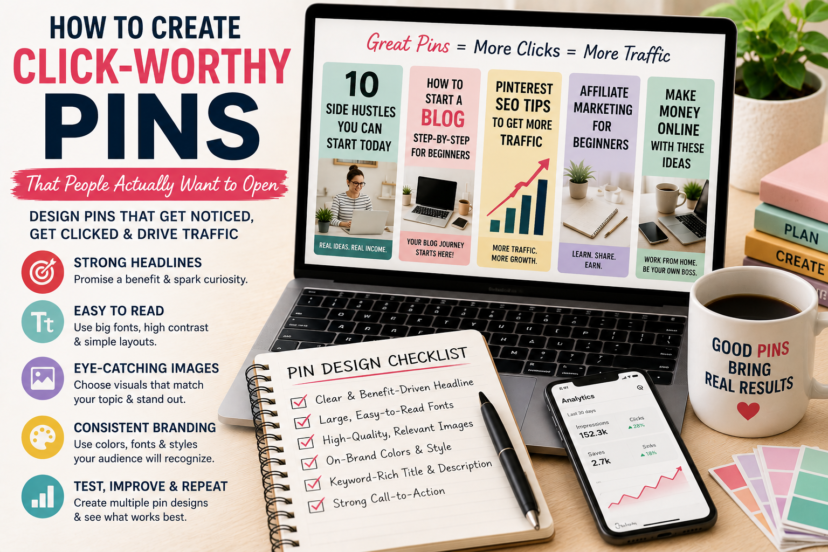
Start With a Strong Headline
Your headline is often the first thing users notice.
Good Pinterest headlines usually promise:
- a solution
- a benefit
- a shortcut
- a step-by-step process
- a list
Examples:
✅ Good headlines:
- 10 Side Hustles You Can Start Today
- How to Start a Blog While Working Full-Time
- Pinterest SEO Tips for Beginners
- The Beginner’s Guide to Affiliate Marketing
❌ Weak headlines:
- My Thoughts on Blogging
- Some Marketing Ideas
- Tips and Tricks
Specific headlines almost always perform better.
Use Easy-to-Read Fonts
Pinterest users scroll quickly.
Your text must be readable within seconds.
Choose:
- large fonts
- strong contrast
- simple typography
- short text blocks
Avoid:
- decorative fonts
- tiny text
- too many colors
- overcrowded designs
If users struggle to read your pin, they will keep scrolling.
Choose Images That Match Your Topic
The image should immediately communicate what your article is about.
Examples:
blogging:
- laptops
- notebooks
- home offices
affiliate marketing:
- analytics dashboards
- online business scenes
side hustles:
- remote work setups
- people working from home
Pinterest users decide very quickly whether a pin feels relevant.
Keep Your Branding Consistent
Over time, consistent branding helps users recognize your content.
Try to use:
- similar colors
- matching fonts
- recognizable layouts
- your website name or logo
You do not need complicated branding.
Simple and consistent designs work best.
Strong designs alone are not enough. Read Pinterest SEO for Beginners to learn how keywords help Pinterest understand and distribute your content.
Create Multiple Pins for One Article
Many beginners create one pin and move on.
Successful Pinterest creators often design several versions of the same article.
You can test:
- different headlines
- new colors
- alternative images
- other layouts
Sometimes a small change can dramatically improve performance.
Creating fresh content becomes much easier when you already have a publishing strategy. Our guide How to Plan Blog Content explains how to organize your articles and topic clusters.
Add Curiosity Without Using Clickbait
Curiosity is powerful.
Good examples:
- Mistakes Beginners Make on Pinterest
- The SEO Strategy Most Bloggers Ignore
- How I Got My First 1,000 Visitors
Avoid misleading claims such as:
- Make €10,000 Tomorrow
- Guaranteed Success in One Week
- Secret Trick Google Hates
Pinterest rewards helpful content, not unrealistic promises.
Test and Improve Your Pins
No one creates perfect pins from the beginning.
Experiment with:
- headlines
- fonts
- templates
- colors
- images
Pay attention to:
- clicks
- saves
- impressions
The more pins you create, the better you will understand your audience.
Consistency matters just as much as design. In How to Stay Consistent as a Blogger, you’ll discover practical habits that help you keep publishing over the long term.
Common Pin Design Mistakes
Avoid these beginner mistakes:
- too much text
- unreadable fonts
- cluttered designs
- misleading headlines
- inconsistent branding
- creating only one pin per article
Simple designs often perform surprisingly well.
Want to master Pinterest step by step? Explore our Pinterest Marketing Hub for more beginner-friendly guides on SEO, traffic strategies, and long-term growth.
Final Thoughts
Learning how to create click-worthy pins takes practice, but you do not need expensive tools or graphic design skills to succeed.
Focus on clear headlines, readable designs, and helpful content. Test different styles and pay attention to what resonates with your audience.
The best Pinterest creators are not necessarily the most artistic—they are the ones who consistently create pins that solve problems and spark curiosity.
FAQ
1. What makes a Pinterest pin clickable?
A strong headline, readable text, attractive images, and clear benefits all increase the chance that users will click.
2. How many pins should I create for one article?
Many creators design several pins for the same post to test different headlines and layouts.
3. Do I need graphic design skills?
No. Beginners can create effective pins using simple templates and free tools like Canva.
4. Should I use clickbait on Pinterest?
No. Curiosity works well, but misleading promises can hurt your results.
5. What is more important: saves or clicks?
For bloggers and affiliate marketers, clicks are usually more valuable because they bring visitors to your website.


