
Pinterest Analytics Explained (How to Understand Your Pinterest Performance)
Introduction
Pinterest Analytics can feel overwhelming at first. Many beginner bloggers open their dashboard, see dozens of numbers, and immediately ask themselves: What do all these metrics actually mean?
The good news is that you do not need to become a data expert to use Pinterest successfully. In fact, most beginners only need to understand a handful of key statistics to improve their strategy.
Pinterest Analytics helps you answer important questions:
- Which pins attract the most attention?
- Which articles receive the most clicks?
- Which topics resonate with your audience?
- Are your designs improving over time?
- Is your Pinterest strategy actually working?
Learning to interpret these numbers can save you countless hours and help you focus on what truly drives traffic.
In this guide, you’ll learn how Pinterest Analytics works, which metrics matter most, and how to use your data to grow your blog more effectively.
What Is Pinterest Analytics?
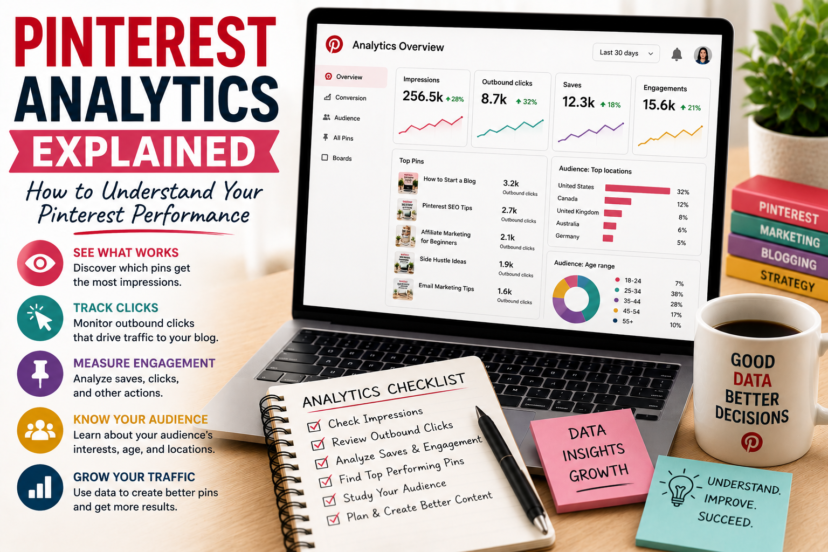
Pinterest Analytics is Pinterest’s built-in reporting tool that shows how users interact with your content.
It tracks how people discover, save, and click on your pins.
With Pinterest Analytics, you can monitor:
- impressions
- saves
- outbound clicks
- engagement
- audience demographics
- top-performing pins
- traffic trends
Rather than guessing what works, analytics gives you real information.
That is especially valuable for beginner bloggers who have limited time and want to invest their effort wisely.
Why Analytics Matters for Bloggers
Many people think Pinterest success depends on luck.
However, successful Pinterest creators rarely rely on luck alone. They analyze their results and adjust their strategy accordingly.
Imagine publishing ten pins.
Without analytics, you might assume that all ten perform equally well.
But the data may reveal that:
- one pin generates most of your clicks
- another receives many saves
- several pins attract almost no attention
These insights help you create better content in the future.
Instead of designing randomly, you can make informed decisions.
Before diving into analytics, it helps to understand how Pinterest actually works. In How Pinterest Works in 2026, you’ll learn why Pinterest behaves more like a visual search engine than a traditional social platform.
Where to Find Pinterest Analytics
To access Pinterest Analytics:
- Log in to your Pinterest account.
- Click on your profile picture.
- Open the Analytics section.
- Choose the timeframe you want to analyze.
Pinterest allows you to review:
- the last 7 days
- the last 30 days
- the last 90 days
- custom time periods
Do not worry if your numbers seem small at first.
Most accounts need time to collect meaningful data.
The Most Important Pinterest Metrics
Pinterest provides many statistics, but beginners should focus on a few key metrics.
Let’s break them down.
Impressions: How Often Your Pins Are Seen
Impressions show how many times Pinterest users have seen your pin.
For example:
- A pin displayed in search results counts as an impression.
- A pin shown in someone’s home feed counts as an impression.
High impressions usually mean:
- Pinterest understands your keywords.
- Your content matches user interests.
- Your account is gaining visibility.
However, impressions alone do not guarantee success.
A pin with 50,000 impressions but very few clicks may need improvement.
Visibility starts with optimization. If you’re still learning the basics, read Pinterest SEO for Beginners to discover how keywords and account structure influence your reach.
Outbound Clicks: The Metric That Matters Most
For bloggers, outbound clicks are often the most important statistic.
An outbound click occurs when someone leaves Pinterest and visits your website.
This is where the real value begins:
- readers discover your articles
- email subscribers join your list
- affiliate links receive clicks
- trust is built
If your goal is blog traffic, outbound clicks deserve special attention.
Many creators celebrate high impressions, but clicks are what actually move your business forward.
Saves: A Sign of Interest
A save happens when someone adds your pin to one of their Pinterest boards.
Saves indicate that users found your content valuable or inspiring.
Pins with many saves often:
- continue performing for months
- reach new audiences
- gain additional visibility
However, saves do not always translate into traffic.
Some users save content and never return to it.
That is why bloggers should balance saves with outbound clicks.
Engagement Rate
Pinterest also tracks engagement.
Engagement includes actions such as:
- saves
- close-ups
- clicks
- swipes
A strong engagement rate often means:
- your design is attractive
- your headline creates curiosity
- your content matches user intent
If engagement is low, consider adjusting your design or messaging.
Top Pins: Your Best Teachers
One of the most useful analytics sections is your list of top-performing pins.
Many beginners immediately ask:
“Why did this pin succeed?”
That is exactly the right question.
Study your best pins carefully.
Look for patterns:
- Which colors perform well?
- Which headlines attract clicks?
- Which topics generate the most interest?
- Which layouts work best?
Your own data is usually more valuable than generic Pinterest advice.
Audience Insights
Pinterest Analytics also provides information about your audience.
You may discover:
- age groups
- locations
- languages
- interests
- devices
These insights can help you create more relevant content.
For example:
If most of your audience is interested in:
- blogging
- entrepreneurship
- side hustles
- online business
you can create more content around those topics.
Understanding your audience helps you work smarter.
Why Some Pins Perform Better Than Others
Many beginners feel frustrated when one pin performs well and another fails.
However, Pinterest success depends on several factors working together.
A successful pin usually combines:
- strong keywords
- clear design
- compelling headlines
- useful content
- consistency
Sometimes even small changes can make a significant difference.
For example:
Changing:
- the headline
- the font size
- the image
- the colors
can dramatically improve performance.
Analytics helps you identify these opportunities.
Design plays a major role in engagement. Our guide How to Create Click-Worthy Pins explains how headlines, layouts, and images influence user behavior.
How to Use Analytics to Improve Your Strategy
Analytics is only useful if you act on the information.
Here are a few practical steps.
Create More of What Works
If a particular topic performs well, create additional content around it.
For example:
If “Pinterest SEO” pins perform strongly, consider publishing:
- advanced Pinterest SEO guides
- keyword tutorials
- pin design articles
Success often leaves clues.
Strong analytics begins with strong keyword research. In Pinterest Keyword Research, you’ll learn how to identify search terms that help Pinterest understand and distribute your content.
Improve Weak Pins
Not every underperforming pin is a failure.
Sometimes you only need to:
- redesign the image
- test a new headline
- update keywords
- improve the description
Pinterest rewards fresh content.
A small update can breathe new life into an older article.
Track Long-Term Trends
Avoid judging your performance based on one week of data.
Pinterest growth is slow.
Instead, compare:
- month-to-month performance
- seasonal trends
- traffic growth over time
Consistency matters more than short-term fluctuations.
Pinterest growth requires patience and consistency. If you struggle to stay motivated, read How to Stay Consistent as a Blogger for practical strategies that help you keep moving forward.
Common Analytics Mistakes Beginners Make
Many creators misinterpret their data.
Avoid these common mistakes:
Obsessing Over Daily Numbers
Traffic naturally rises and falls.
Checking analytics every hour creates unnecessary stress.
Instead, review your data weekly or monthly.
Focusing Only on Impressions
Impressions are exciting, but they do not automatically generate income.
A smaller number of highly targeted clicks can be far more valuable.
Ignoring Successful Pins
Many bloggers constantly create new content without analyzing existing successes.
Your best-performing pins contain valuable lessons.
Giving Up Too Early
Pinterest often requires several months before significant results appear.
Analytics should motivate you—not discourage you.
How Often Should You Check Pinterest Analytics?
You do not need to become obsessed with statistics.
For most bloggers, this schedule works well:
- weekly: quick overview
- monthly: deeper analysis
- quarterly: long-term review
This balance helps you make improvements without becoming overwhelmed.
Want to master Pinterest step by step? Explore our Pinterest Marketing Hub for more beginner-friendly guides on SEO, traffic strategies, and long-term content growth.
Final Thoughts
Understanding Pinterest Analytics is not about memorizing dozens of metrics.
Instead, it is about answering simple questions:
- What content works?
- What do readers click on?
- Which topics deserve more attention?
- How can you improve?
Numbers alone will not grow your blog.
However, when you combine analytics with good content, strong keywords, and consistency, Pinterest becomes a powerful source of long-term traffic.
Treat analytics as a guide—not as a report card—and focus on steady improvement.
FAQ
1. What is Pinterest Analytics?
Pinterest Analytics is Pinterest’s reporting tool that shows how users interact with your pins and content.
2. Which Pinterest metric is most important for bloggers?
For most bloggers, outbound clicks are the most important metric because they bring visitors to the website.
3. Are impressions more important than clicks?
No. Impressions show visibility, but clicks are usually more valuable for growing a blog.
4. How often should I check Pinterest Analytics?
Most creators benefit from reviewing analytics weekly and performing a deeper analysis once a month.
5. How long does it take to see results in Pinterest Analytics?
Pinterest growth often takes several weeks or months, especially for new accounts.


