
Internal Linking Explained (How to Connect Your Blog Posts the Right Way)
Introduction
Understanding internal linking explained in simple terms can make a huge difference for beginner bloggers. Many people focus on writing new articles but forget to connect them properly.
However, internal links are one of the easiest ways to improve your website. They help readers discover more content, keep visitors on your site longer, and make it easier for Google to understand your blog.
In this guide, you’ll learn what internal links are, why they matter, and how to use them effectively—even if you’re just starting your blogging journey.
What Is Internal Linking?
An internal link is simply a link from one page on your website to another page on the same website.
For example:
- linking from your homepage to your blog
- connecting related articles
- adding links to category pages
- creating topic clusters
Unlike external links, which point to other websites, internal links keep visitors inside your own content ecosystem.
Why Internal Links Matter
Internal links help both readers and search engines.
For readers, they:
- make navigation easier
- suggest useful articles
- increase time on site
- create a better experience
For Google, they:
- explain the structure of your website
- show relationships between topics
- distribute authority across pages
- help search engines discover new content
Without internal links, your articles become isolated pages.
Step 1: Link Related Articles Naturally
The best internal links appear naturally inside your text.
For example, if you’re writing about SEO, it makes sense to link to an article about keyword research.
Good internal links should answer one question:
“What would the reader logically want to learn next?”
Avoid adding links simply because you can.
Every link should provide value.
For example, if you’re still learning the basics of SEO, our guide SEO for Beginner Bloggers explains how search engines evaluate content and why internal links play such an important role.
Step 2: Use Descriptive Anchor Text
The clickable words of a link are called anchor text.
Good examples:
- How to Plan Blog Content
- Keyword Research for Beginners
- SEO for Beginner Bloggers
Poor examples:
- click here
- read more
- this article
Descriptive anchor text helps readers and search engines understand where the link leads.
Before creating links between articles, it helps to understand which search terms your audience is using. Read Keyword Research for Beginners to learn how to find topics people are actively searching for.
Step 3: Build Topic Clusters
Successful blogs organize content into groups of related articles.
For example:
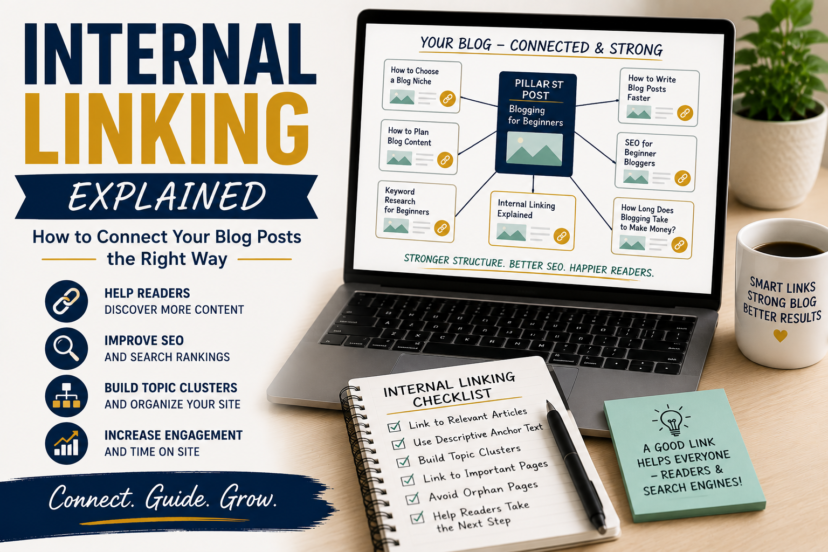
Blogging Cluster
- How to Choose a Blog Niche
- How to Plan Blog Content
- How to Write Blog Posts Faster
- SEO for Beginner Bloggers
- Keyword Research for Beginners
- Internal Linking Explained
This structure creates a clear learning path for readers.
At the same time, Google gains a better understanding of your expertise.
Strong topic clusters start with good planning. In How to Plan Blog Content, you’ll learn how to organize your ideas and create a publishing strategy that supports long-term growth.
Step 4: Link to Important Pages More Often
Not all pages on your website are equally important.
Pages such as:
- your homepage
- hub pages
- cornerstone articles
- lead magnets
should receive more internal links than smaller supporting posts.
This tells Google which pages matter most.
Of course, creating cornerstone content becomes much easier once you’ve chosen the right niche. Our article How to Choose a Blog Niche will help you build a strong foundation for your blog.
Step 5: Avoid Common Linking Mistakes
Many beginners make the same mistakes:
- adding too many links
- linking unrelated articles
- using generic anchor text
- forgetting older posts
- creating orphan pages
An orphan page is a page that has no internal links pointing to it.
Google may struggle to find these pages.
How Many Internal Links Should You Add?
There is no perfect number.
A short article may only need three or four internal links.
A longer article may include ten or more.
Instead of counting links, ask yourself:
“Will this link genuinely help my reader?”
If the answer is yes, keep it.
Want to improve your blogging skills step by step? Visit our Blogging Hub to explore more beginner-friendly guides on writing, SEO, keyword research, and long-term website growth.
Final Thoughts
Internal linking is one of the simplest SEO strategies beginners can implement immediately.
You don’t need expensive tools or technical skills. By connecting related content, using descriptive anchor text, and building topic clusters, you’ll improve both the reader experience and your website’s long-term SEO.
The goal isn’t to add as many links as possible—it’s to guide readers through your content in a helpful and logical way.
Download the free guide:
The 500€ Side Income Starter Plan:
FAQ
1. What is an internal link?
An internal link connects one page on your website to another page on the same website.
2. How many internal links should a blog post have?
There is no fixed number. Use as many links as necessary to help readers find related content.
3. Do internal links improve SEO?
Yes. Internal links help search engines understand your website structure and discover new pages.
4. What is anchor text?
Anchor text is the clickable text used in a link. Descriptive anchor text is better for both users and SEO.
5. What is an orphan page?
An orphan page is a page that has no internal links pointing to it, making it harder for readers and search engines to find.


