
How to Increase Opt-In Rates: A Beginner’s Guide to Better Email Signups
Introduction
You can publish useful content, attract relevant visitors, and still find that very few people join your email list.
That does not necessarily mean you need more traffic.
Sometimes the bigger opportunity is to look at what happens after someone arrives on your website.
Do visitors understand what you are offering?
Does the signup opportunity relate to what they are reading?
Is it clear what they will receive?
Does the form work well on the device they are using?
And perhaps most importantly: does subscribing feel like a useful next step?
These questions are at the heart of improving your opt-in rate.
The goal is not to pressure more visitors into giving you their email addresses. It is to make the value of subscribing clearer to the people for whom your emails are genuinely relevant.
In this guide, we will look at practical ways to improve that experience and learn from the results.
What Is an Opt-In Rate?
An opt-in rate describes the proportion of people who subscribe relative to the group you are measuring.
A simplified example:
If a signup opportunity is seen by 100 visitors and five of them subscribe, the resulting rate would be 5%.
The basic calculation is:
Subscriptions ÷ Relevant Visitors or Views × 100 = Opt-In Rate
But there is an important detail.
The denominator matters.
A sitewide visitor-to-subscriber rate is not the same as the conversion rate of a particular form. Your email platform, analytics tool, or form software may also define views, visitors, submissions, and conversions differently.
That means percentages should always be interpreted in context.
Rather than treating the opt-in rate as a universal score for your website, use it as one piece of information about how people respond to a particular signup opportunity.
If you are still building the foundation behind that signup, Why Every Side Hustle Needs an Email List explains how email can create an ongoing, permission-based connection with interested readers.
More Traffic and Better Signups Solve Different Problems
When an email list grows slowly, it is tempting to assume that more website traffic is the answer.
Sometimes it is.
A website with very few relevant visitors naturally has fewer opportunities to gain subscribers.
But traffic and opt-in performance are two different parts of the system.
Think of the journey as:
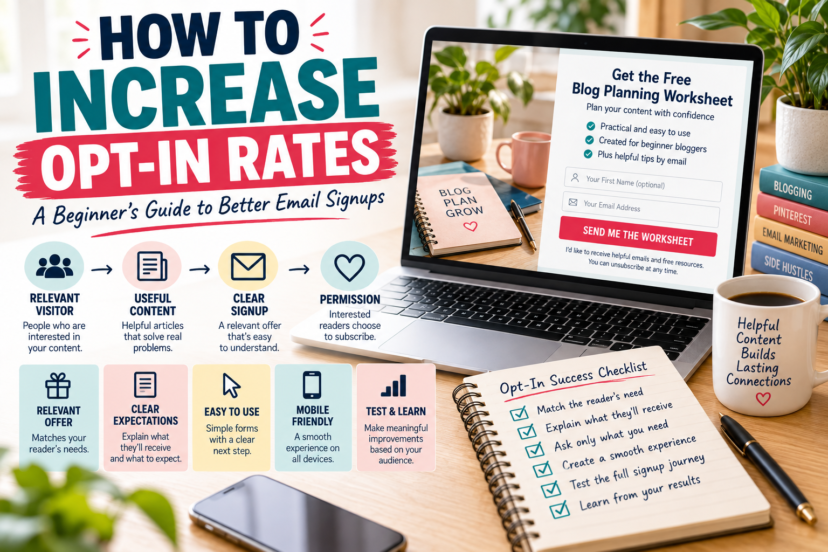
Relevant Visitor → Useful Content → Relevant Signup Opportunity → Voluntary Subscription
More traffic affects the beginning of that journey.
Improving the signup experience affects what happens later.
Neither automatically fixes the other.
A website could attract many poorly matched visitors and gain few relevant subscribers. Another might receive less traffic but have a signup offer closely connected to what its readers are trying to accomplish.
Instead of immediately choosing between “I need more traffic” and “I need a better conversion rate,” examine the entire path.
1. Give People a Relevant Reason to Subscribe
A generic invitation such as:
Join my newsletter
tells visitors what action to take, but very little about why they might want to take it.
A stronger signup opportunity explains the value of continuing the relationship.
That could mean receiving a useful resource, a short email course, practical updates, or ongoing guidance on a topic the visitor already cares about.
For example:
Get the Blog Content Planning Worksheet
is easier to evaluate because the reader knows what is being offered.
But specificity alone is not enough.
The resource still needs to be relevant.
A visitor reading about blog content planning may reasonably be interested in a content-planning worksheet. Someone reading about Pinterest Analytics may have a very different immediate need.
Your Lead Magnet Ideas for Beginners guide explores how to choose a resource by starting with the reader’s situation rather than simply choosing whichever lead-magnet format seems popular.
A signup becomes more meaningful when the reason to subscribe connects naturally with the reason someone came to the page.
2. Make the Offer Easy to Understand
Visitors should not have to interpret vague marketing language to understand what they are signing up for.
Clarity can include several things:
what they will receive, what the resource or emails are about, and what kind of communication may follow.
Consider the difference between:
Get Updates
and:
Get the Free Blog Planning Worksheet + Beginner Blogging Tips by Email
The second version provides more context.
That does not mean longer copy is always better. Sometimes a concise headline and one explanatory sentence are enough.
The objective is to remove unnecessary uncertainty.
Before publishing a signup form, read it from the perspective of someone encountering your website for the first time.
Would they understand what they are choosing?
If the answer is unclear, the copy probably needs more work.
3. Match the Signup Opportunity to the Content
A signup form does not exist separately from the page around it.
Context matters.
Someone reading an article about Pinterest keyword research has already demonstrated interest in that particular subject. A related Pinterest resource can continue the same learning journey.
For example:
Pinterest Keyword Article → Pinterest Research Worksheet
Blog Planning Article → Content Planning Template
Affiliate Niche Article → Niche Evaluation Worksheet
This approach is sometimes described as a content upgrade, although you do not need to create a unique download for every article.
Topic clusters provide a more manageable approach.
Several related Pinterest articles could point toward the same useful Pinterest resource, while your email-marketing articles could offer something designed for readers building an email list.
The principle is simple:
Content → Current Need → Relevant Next Step
Do not assume that greater relevance guarantees a particular conversion rate. Instead, treat relevance as a hypothesis worth testing with your own audience.
4. Place Signup Opportunities Where They Make Sense
There is no universally best location for an email signup form.
A form near the beginning of an article is visible early, but the visitor may not yet know enough about you or the offer.
A form later in the article appears after the reader has consumed more content, but not everyone will reach it.
A homepage, hub page, Start Here page, sidebar, footer, popup, or embedded form all create different contexts.
Instead of asking:
Where should every website put its signup form?
ask:
At what point would this invitation make sense in the reader’s journey?
For example, an embedded signup after a section explaining a problem may work naturally when the lead magnet helps solve that exact problem.
An end-of-article form may provide a useful next step after the reader has finished the guide.
Your homepage may need a broader offer because visitors arrive there with different intentions.
Placement is therefore something to evaluate rather than a rule to copy.
5. Make the Form Proportionate to the Exchange
Every field you request should have a reason to exist.
For a simple newsletter or lead-magnet signup, an email address may be all you actually need. In other situations, asking for a first name could support how you intend to communicate.
Additional information may sometimes be useful, but collecting data simply because your software provides another field can create unnecessary complexity.
Ask yourself:
Do I genuinely need this information at signup?
If not, consider leaving it out.
This is useful not only from a usability perspective but also from a data-minimization perspective. Privacy requirements vary by jurisdiction, so make sure your forms and data practices reflect the rules that apply to your business and audience.
The objective is not necessarily to create the shortest possible form.
It is to ask for information that has a clear purpose.
6. Explain What Happens After Signup
A visitor is not merely requesting a file.
They are beginning an email relationship.
Your signup experience should reflect that.
If someone receives a worksheet immediately and will also receive future emails from Realistic Side Income, the form should make that relationship understandable.
Avoid creating the impression that someone is simply clicking a download button if they are also subscribing to ongoing communication.
Clear expectations can include the type of emails you intend to send and, when appropriate, an indication of the communication people can expect.
That expectation should then match what actually happens.
The journey might look like:
Signup → Deliver What Was Promised → Welcome → Continue With Relevant Communication
Your Perfect Welcome Email Sequence explains how to build that transition without assuming every subscriber needs the same fixed sequence.
7. Use Headlines and Calls to Action That Describe the Next Step
Signup copy often receives surprisingly little attention.
Generic buttons such as Submit tell people what the interface is doing, but not necessarily what they are about to receive.
A more descriptive call to action could be:
Get the Worksheet
Send Me the Checklist
Get the Free Guide
The appropriate wording depends on the offer and the surrounding context.
The same principle applies to the headline.
Instead of trying to make it unusually clever or persuasive, make it informative enough that someone can quickly understand the opportunity.
Headline, supporting copy, form fields, and button should work together as one small decision experience.
Good signup copy helps people understand the choice. It does not need to manufacture urgency around it.
8. Make the Mobile Experience Easy to Use
A signup form that works beautifully on a desktop can feel very different on a smaller screen. Text may become difficult to read, form fields can feel cramped, buttons may be awkward to tap, or important information can move so far down the page that the offer loses its context.
For that reason, mobile testing should involve more than resizing your browser window. Open the page on a phone and experience the signup as a visitor would, from discovering the offer to entering an email address and submitting the form.
Then follow the process beyond the form itself. Make sure any confirmation step is understandable, the promised resource arrives as expected, and the first email is comfortable to read and interact with on a mobile screen.
This kind of testing can reveal problems that are easy to miss while working on your website from a computer. A technically responsive layout does not necessarily mean that every part of the experience is convenient for the person using it.
Mobile optimization therefore extends beyond making a form fit on a smaller screen. It means making sure the entire path from interested visitor to new subscriber works smoothly on the device they are actually using.
Do not just test how the form looks on mobile. Test what it feels like to become a subscriber on mobile.
9. Reduce Competing Decisions Around the Signup
A signup opportunity can become difficult to understand when too many other things compete for attention.
Imagine a section containing an email form, affiliate banner, several buttons, social-media icons, an advertisement, and another promotional message.
The visitor now has several unrelated decisions to make.
That does not mean every signup form must sit inside an empty white box.
It means the visual and informational hierarchy should make sense.
When the email offer is the intended next step, give the reader enough clarity to understand that step without unnecessarily competing messages.
The same principle we used for lead-magnet design applies here:
Design should support the decision rather than distract from it.
10. Use Social Proof Carefully
Subscriber counts, testimonials, or other forms of social proof can provide additional context when they are genuine and relevant.
But they are not required.
A new website does not need to look established by inventing impressive numbers or vague claims such as:
Trusted by thousands.
If you have meaningful evidence that helps someone evaluate the offer, you can present it accurately.
If you do not, focus on explaining the value of the signup clearly.
An honest offer for a useful resource is stronger than manufactured credibility.
11. Test Meaningful Changes
Testing can help you learn how visitors respond to different signup experiences.
But not every tiny variation deserves a test.
Changing a button from one shade of green to another may be less informative than testing a genuinely different question, such as:
- Is the offer itself relevant?
- Does the headline explain the benefit?
- Would another placement better match the reader’s journey?
- Is the form asking for information you do not need?
- Does a more closely related resource make sense for this content?
When possible, change one meaningful element at a time so that the result is easier to interpret.
And avoid treating every difference as proof of cause.
Small samples fluctuate. Traffic sources change. Seasonal behavior changes. Different pages attract different people.
Testing is most useful when it helps you learn, not when it becomes an endless search for a perfect conversion rate.
12. Look Beyond the Opt-In Rate
An opt-in rate can tell you that subscriptions happened.
It cannot tell you everything about their quality or what happens afterward.
Suppose one signup form attracts many subscribers but those people quickly unsubscribe or rarely interact with anything relevant afterward.
Another form may generate fewer subscriptions but connect with people who continue reading your emails and returning to useful content.
The higher initial percentage does not automatically tell you which signup experience better supports your goals.
Consider the wider journey:
Signup → Resource Delivery → Welcome → Continued Communication → Relevant Actions
Depending on your email platform and analytics setup, you might examine subscriptions, confirmation completion, email delivery, clicks, replies, unsubscribes, or other actions relevant to your purpose.
No single number tells the whole story.
What Is a Good Opt-In Rate?
This is one of the most tempting questions in email marketing.
It is also difficult to answer responsibly with one percentage.
Opt-in rates can vary according to the traffic source, audience, page type, offer, form type, placement, device, measurement method, and many other factors.
A highly targeted landing page should not automatically be compared with a general blog homepage.
A popup impression is not necessarily equivalent to a website session.
And a visitor arriving from a highly relevant article may behave differently from someone who reaches your site for another reason.
For that reason, a universal benchmark can create more confusion than clarity.
A more useful starting point is your own baseline.
Measure the signup opportunity consistently.
Make a meaningful improvement.
Observe what changes.
Then use that information to decide what to investigate next.
Your opt-in rate is most useful when it helps you learn about your own audience—not when it becomes a score against someone else’s website.
A Simple Opt-In Improvement Process
You do not need to redesign your entire email strategy at once.
Start with one important signup path.
Look at the page where visitors encounter the offer and follow the journey yourself.
Then work through a simple cycle:
Observe → Identify Friction → Form a Hypothesis → Change One Meaningful Element → Measure → Learn
Perhaps the offer is too broad.
Maybe the signup copy is unclear.
The form could be difficult to use on mobile.
The lead magnet may not match the article.
Or the technical delivery process might not work as expected.
Improvement begins by identifying the actual problem rather than automatically changing colors, buttons, and headlines.
Remember What the Opt-In Represents
Conversion optimization can easily turn people into percentages.
But an email signup is a choice made by an individual.
Someone has decided that continuing the connection with your business may be useful enough to give you permission to contact them.
That permission deserves respect.
It means being clear about what people are signing up for, delivering what you promised, protecting their information appropriately, and making it straightforward to stop receiving emails when they no longer want them.
Seen this way, a higher opt-in rate is not the ultimate goal.
A better goal is to create a signup experience that connects interested people with communication they genuinely want to receive.
Final Thoughts
Increasing your opt-in rate is not about finding a secret headline, perfect button, universal form location, or industry benchmark.
It is about understanding the journey from visitor to subscriber.
Start with relevance.
Make the offer clear.
Place it where it makes sense.
Ask only for information you have a reason to collect.
Set appropriate expectations.
Test the experience on different devices.
Then measure what happens and learn from it.
The broader system looks like this:
Relevant Visitor → Useful Content → Clear Signup Opportunity → Permission → Helpful Email Experience
That is a much stronger foundation than trying to maximize a percentage in isolation.
Do not optimize only for more signups. Optimize for a clearer reason for the right people to subscribe.
For the next stage of the journey, the Email Marketing Hub brings together the Realistic Side Income guides on lead magnets, welcome emails, ongoing communication, list growth, and email strategy.
FAQ
1. What is a good email opt-in rate?
There is no universal percentage that defines a good opt-in rate. Results depend on factors such as traffic source, page type, audience, offer, form placement, and how the rate is measured. Your own consistently measured baseline is often more useful for evaluating improvement.
2. How can I increase my email opt-in rate?
Start by examining relevance and clarity. Make sure the signup offer fits the reader’s needs, clearly explains what they will receive, works well on mobile, and appears at a sensible point in the visitor journey. Then measure the results and improve based on what you learn.
3. Do I need more traffic to grow my email list?
More relevant traffic can create more opportunities for subscriptions, but traffic is only one part of the process. Improving the signup experience may help you make better use of the visitors you already have.
4. Where should I place email signup forms?
There is no universally best location. Embedded forms, end-of-article forms, homepages, hub pages, popups, and other placements create different contexts. Choose locations that make sense in the reader’s journey and evaluate their performance on your own site.
5. Should I ask for a subscriber’s name?
Only if you have a useful reason to collect it. An email address may be sufficient for a simple signup, while a first name can be appropriate in some situations. Avoid collecting information simply because your form software allows it.