
Lead Magnet Ideas for Beginners: 10 Useful Ways to Grow Your Email List
Introduction
You have published useful content and added an email signup form to your website.
But visitors are not automatically going to subscribe simply because the form is there.
They need a reason to continue the relationship.
That is where a lead magnet can help.
A lead magnet is a resource, tool, or piece of content offered to people who choose to join your email list. It gives the visitor a clearer reason to subscribe than a generic “Join my newsletter” message.
But the format itself is not what makes a lead magnet useful.
A checklist is not automatically effective.
Neither is an ebook, template, planner, or email course.
What matters is the connection between:
The Reader → Their Current Need → Your Resource → What Happens Next
In this guide, we will explore ten beginner-friendly lead magnet ideas and, more importantly, how to choose one that makes sense for your audience and your side hustle.
What Is a Lead Magnet?
A lead magnet is something useful you offer as part of an email signup.
For example, a reader might enter their email address to receive:
- a checklist,
- a template,
- a worksheet,
- a short guide,
- a resource collection,
- or an email course.
The subscriber gets something they have chosen to receive, while you gain permission to continue communicating according to the expectations established at signup.
That last part matters.
A lead magnet is not simply a trick for collecting email addresses.
It is the beginning of a permission-based relationship.
The goal is not to get an email address. The goal is to give the right person a good reason to stay connected.
If you are still building the foundation of your email strategy, Why Every Side Hustle Needs an Email List explains why that continuing connection can matter.
Why Would Someone Subscribe for a Lead Magnet?
An email address may seem like a small thing to ask for, but subscribers are also giving you permission to enter a personal communication space: their inbox.
So the offer needs to make sense from their perspective.
Imagine someone has just read an article about choosing a profitable affiliate marketing niche.
At that moment, they may be trying to compare several niche ideas.
A downloadable worksheet that helps them evaluate those ideas could be a natural next step.
A generic 50-page guide to online business probably has much less connection to the problem they are currently solving.
This gives us a useful principle:
A strong lead magnet continues the conversation the reader is already having with your content.
Instead of beginning with “What PDF should I create?”, begin with the reader.
What are they trying to do?
Where are they getting stuck?
What would help them take the next step?
The answers can guide the format.
What Makes a Useful Lead Magnet?
There is no universal formula, but several characteristics are worth considering.
A useful lead magnet usually has a clear purpose. The subscriber should understand what they are getting and why it may help.
It should also be relevant to the content or audience that leads to the signup.
The scope should fit the problem. Some topics can be addressed with a one-page checklist; others require more explanation.
And finally, the resource should create a logical bridge into whatever happens after the download.
Think of it as:
Current Problem → Useful Resource → Next Step
That is more important than page count, design complexity, or trying to make the resource look unusually valuable.
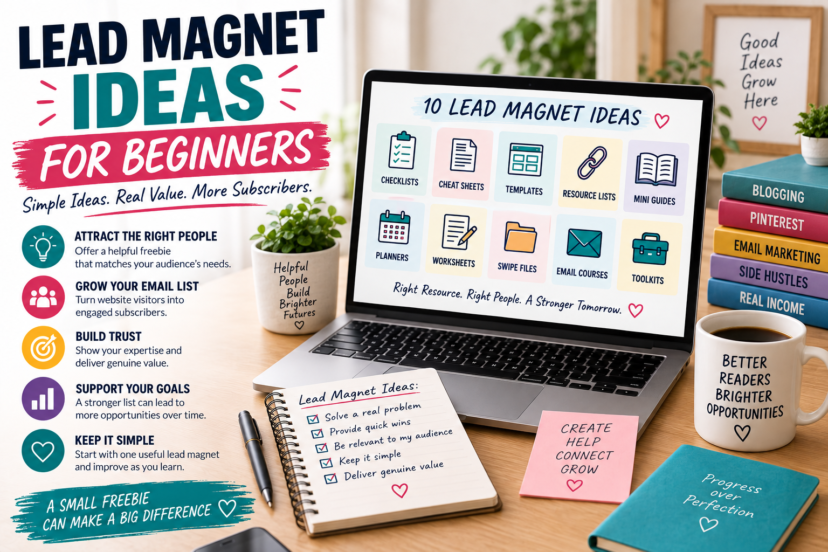
1. Checklists
A checklist can be useful when a task involves several steps that are easy to overlook.
For example:
- Blog Launch Checklist
- Pinterest Profile Setup Checklist
- Blog Post SEO Checklist
- Affiliate Content Review Checklist
The strength of this format is structure.
Instead of explaining an entire topic from beginning to end, you help someone keep track of the actions involved.
A checklist therefore works particularly well when the reader already understands the basic task but needs help completing it systematically.
It does not need to contain dozens of items.
Include what genuinely belongs in the process.
2. Cheat Sheets and Quick References
Some information is useful repeatedly.
That makes it a good candidate for a quick-reference resource.
Examples might include:
- Pinterest Analytics Reference
- Blogging Terminology Cheat Sheet
- Email Marketing Terms for Beginners
- SEO Elements Quick Reference
The goal is not necessarily to teach the entire subject.
Instead, the resource makes important information easier to find when the reader needs it again.
This distinction can help you avoid turning every lead magnet into another ebook.
3. Templates
Templates can help when readers understand what they want to create but are unsure how to structure it.
Possible examples include:
- Blog Post Planning Template
- Content Brief Template
- Email Planning Template
- Pinterest Pin Planning Template
A useful template provides enough structure to make starting easier while still leaving room for the user to adapt it.
Avoid promising that a template will produce a particular result.
Its purpose is to provide a starting framework—not eliminate the need for judgment.
4. Resource Collections
Beginners often spend a significant amount of time trying to understand which resources are relevant to a particular task.
A carefully selected collection can reduce some of that research.
For example:
- Beginner Blogging Resources
- Pinterest Research Resources
- Free SEO Learning Resources
- Email Marketing Setup Resources
But be selective.
A list of 50 links is not automatically more useful than five carefully chosen ones.
Explain what each resource is for and why someone might use it.
And when affiliate links are included, disclose that relationship appropriately.
The value comes from selection and context, not merely from collecting links.
5. Mini Guides
Some problems need more explanation than a checklist can provide.
That is where a short guide can make sense.
Possible topics include:
- How to Choose Your First Blog Topic
- A Beginner’s Guide to Planning Pinterest Content
- Understanding Your First Affiliate Program
- Getting Started With Email Marketing
There is no ideal page count.
A guide should be long enough to explain what it promises and short enough to remain focused on that purpose.
Do not add pages simply to make the download appear more substantial.
Useful scope matters more than impressive length.
6. Planners
A planner can help readers turn an intention into an organized process.
Examples include:
- Weekly Side-Hustle Planner
- Blog Content Planner
- Pinterest Content Planner
- Monthly Business Review
A planner works best when there is genuinely something worth planning.
For example, a content planner might help someone organize topics, publication status, internal links, and promotional ideas.
The format can be printable, digital, or both depending on how your audience is likely to use it.
The objective is not to create another document people download and forget.
It is to support an activity they actually want to perform.
7. Worksheets
Worksheets are especially useful when the reader needs to think through a decision, rather than simply consume information.
For example:
- Choose Your Blog Niche Worksheet
- Side-Hustle Evaluation Worksheet
- Content Topic Planning Worksheet
- Affiliate Program Comparison Worksheet
A good worksheet guides thinking without pretending to make the decision for the user.
Instead of telling someone which niche they should choose, for example, you might help them compare factors such as interest, knowledge, audience problems, content possibilities, and monetization options.
That turns passive reading into active consideration.
8. Example Collections and Swipe Files
Sometimes readers do not need another explanation.
They need examples.
An example collection might include:
- Blog Headline Examples
- Pinterest Pin Angles
- Welcome Email Openings
- Call-to-Action Examples
- Lead Magnet Title Ideas
The important word here is examples.
A swipe file should provide inspiration and patterns people can adapt rather than encourage them to copy wording blindly.
Context helps here too.
Explain why an example works for a particular situation and when another approach might be more appropriate.
That teaches the principle behind the example.
9. Email Courses
The lead magnet does not have to be a downloadable file.
You can deliver the resource through email itself.
For example:
5 Lessons for Planning Your First Blog
or:
A Beginner Email Series on Pinterest Analytics
This format can work particularly well when the subject is easier to understand in stages.
It also naturally introduces subscribers to receiving emails from you.
However, avoid choosing an arbitrary number of days simply because “5-Day Challenge” or “7-Day Course” sounds marketable.
Ask how many lessons the topic actually requires and what spacing gives people a reasonable opportunity to use the information.
10. Toolkits
A toolkit combines several related resources around one purpose.
For example, a Blog Planning Toolkit might contain:
- a topic worksheet,
- a content planner,
- a publishing checklist,
- and a small resource guide.
The advantage is that different formats can support different parts of the same task.
But more components do not automatically create more value.
Four unrelated downloads bundled together can be less useful than one focused worksheet.
A toolkit should feel like a coherent system:
One Goal → Several Supporting Resources
not:
More Files = Better Offer
How to Choose the Right Lead Magnet
Choosing a lead magnet becomes much easier when you stop comparing formats and start thinking about what the reader is trying to accomplish.
Imagine someone arrives at an article about keyword research. They may understand the basic concept but still struggle to organize potential keywords, compare ideas, or decide what to research next. A worksheet, planning template, or compact reference could extend the article by helping with that particular task.
A visitor on your Start Here page is in a different situation. They may still be exploring blogging, affiliate marketing, Pinterest, or other ways to build a side income. Because their immediate direction is less defined, a broader planning resource may make more sense there than a highly specialized checklist.
This is why the same lead magnet does not need to appear everywhere on your website.
Start with the situation rather than the format. Consider what brought the reader to the page, what they are likely trying to understand or accomplish, and which next step would naturally build on the content they have just consumed.
From there, choose the format that makes that next step easier.
A decision that requires comparison may benefit from a worksheet. A process with several steps might suit a checklist. Something readers need to create themselves could be supported by a template, while a subject requiring additional explanation may call for a short guide.
The process therefore becomes:
Understand the Context → Identify the Next Need → Decide How to Help → Choose the Format
Do not start by asking what kind of lead magnet you should create. Start by asking what would be useful to the reader at this point in their journey.
Match the Lead Magnet to the Content
Relevance between the page and the signup offer can make the transition feel much more natural.
For example:
Pinterest Keyword Article → Keyword Research Worksheet
Blog Planning Article → Content Planning Template
Email List Article → Email Setup Checklist
Affiliate Niche Article → Niche Evaluation Worksheet
The original version of this article claimed that a closer match automatically produces a higher conversion rate. We do not need that promise.
The more defensible reason to create relevant offers is simpler:
The resource continues the problem the visitor is already trying to solve.
That makes the signup easier to understand and gives the resulting email communication clearer context.
One Lead Magnet Does Not Need to Fit Your Entire Website
A common beginner instinct is to create one enormous resource broad enough for every visitor.
Something like:
The Ultimate Guide to Making Money Online
The problem is not merely that it is large.
It is that visitors arriving for very different reasons may have very different needs.
Someone reading about Pinterest Analytics is in a different context from someone comparing affiliate programs.
You do not need a separate lead magnet for every article, either.
A practical middle ground is to think in topic clusters.
For Realistic Side Income, that could eventually mean different resources for areas such as:
Blogging
Pinterest Marketing
Affiliate Marketing
Email Marketing
Starting a Side Hustle
One useful resource can then support several closely related articles.
That keeps the strategy relevant without creating dozens of downloads you have to maintain.
Free Does Not Mean Low Quality
A lead magnet does not need to be large, elaborate, or expensive to produce. A simple resource can be entirely appropriate when it solves the problem it promises to address.
What matters is that the subscriber can actually use it.
A worksheet should provide enough context for someone to understand what to do with it. A checklist needs accurate and relevant steps rather than extra items added simply to make it look more substantial. Templates should be practical enough to adapt, while recommended resources should still be relevant when someone accesses the list.
In other words, simplicity and quality are not opposites.
A focused one-page resource that has been carefully created can be more useful than a polished 30-page ebook filled with information the reader does not need.
And although the resource may be free, the exchange still matters. The subscriber has chosen to share their email address and given you permission to continue communicating with them.
That makes delivering what you promised particularly important.
A lead magnet can be simple to create. It should never feel careless to use.
Design Should Make the Resource Easier to Use
A lead magnet does not need sophisticated graphic design to be valuable. Its presentation should primarily help the reader understand and use the resource.
Good design creates clarity. Headings make information easier to navigate, readable typography reduces unnecessary effort, and thoughtful spacing helps separate ideas and actions. A logical structure allows the reader to see where to begin and what to do next.
The layout should also reflect the purpose of the resource. A worksheet needs enough room for someone to think and write, while a checklist should make individual steps easy to identify and follow. Longer guides benefit from a clear hierarchy that helps readers move through the information without losing their place.
Branding can provide visual continuity with your website and emails, but it does not need to dominate the page. A logo, familiar typography, or consistent visual style may be enough to show where the resource came from.
Decorative elements are useful only when they support the experience rather than distract from it.
A better design question is therefore not whether the lead magnet looks impressive, but whether its appearance helps someone use it for the purpose it was created for.
Good lead-magnet design does not compete for attention. It guides attention toward what matters.
Make the Signup Offer Clear
Even a useful resource can be difficult to evaluate if the signup form does not explain it.
Instead of:
Get My Free Guide
you can be more specific about what the person will receive.
For example:
Plan Your First Month of Blog Content
Get the Free Content Planning Worksheet
That gives the visitor more context before deciding whether to subscribe.
The form should also make the email relationship clear rather than disguising the signup as nothing more than a file download.
Subscribers should understand that they are joining your email communication and should be able to see relevant privacy information.
Consent and disclosure requirements vary by jurisdiction, so your implementation should reflect the rules that apply to your business and audience.
Where Should You Promote a Lead Magnet?
You do not need to place every signup offer everywhere.
Context matters here too.
Relevant opportunities might appear:
- inside related articles,
- near the end of useful content,
- on a relevant hub page,
- on your Start Here page,
- or in another location where the resource logically supports the visitor’s next step.
Your Pinterest Marketing Hub, for example, could point toward a Pinterest-related resource if that is what visitors there are trying to learn.
The goal is not maximum form exposure.
It is to create sensible opportunities to continue the relationship.
What Happens After Someone Downloads It?
The lead magnet is not the end of the process.
It is the transition into email.
That means the experience after signup deserves just as much thought as the resource itself.
A simple journey might look like this:
Relevant Content → Lead Magnet → Signup → Deliver the Resource → Welcome → Continue Helping
Your Perfect Welcome Email Sequence can help you design that next stage without forcing every subscriber through a rigid five-email formula.
After the initial welcome experience, How Often Should You Email Subscribers? explores how expectations, relevance, and audience feedback can guide your ongoing communication.
The lead magnet therefore belongs inside a larger system.
Not by itself.
Measure What Happens and Improve
You do not need to know in advance whether your first lead magnet will be the right one.
Publish it and observe.
Depending on your tools, you may be able to examine things such as:
- how often the signup form is viewed,
- how many people subscribe,
- whether the resource link is used,
- what subscribers click afterward,
- replies and questions,
- unsubscribes,
- or other actions relevant to your business.
Be careful about assigning causes too quickly.
A low signup rate does not automatically mean the resource is bad.
The offer may be unclear.
The placement may be poor.
The traffic may not match the topic.
There may be a technical problem.
Or visitors may simply not want that particular resource.
Use the data to develop questions rather than jump to conclusions.
Publish → Observe → Question → Learn → Improve
That process is more useful than trying to create the “perfect” lead magnet before anyone has seen it.
Your First Lead Magnet Can Be Simple
Beginners often turn lead-magnet creation into a major project.
It does not have to be.
Start with a real problem you already understand.
Choose a format that helps with that problem.
Create the resource.
Connect it to an appropriate signup form.
Deliver it reliably.
Then learn from what happens.
A one-page worksheet that fits the reader’s needs can be a perfectly legitimate starting point.
So can a short email course or a useful template.
The objective is not to create the biggest free resource in your niche.
It is to create a useful reason for the right visitor to continue the relationship.
Final Thoughts
There is no universally best lead magnet for beginners.
Checklists can work.
Templates can work.
Worksheets, guides, planners, email courses, resource collections, and toolkits can all make sense.
The format is secondary.
Start with the person already reading your content.
Understand what they are trying to accomplish.
Identify a useful next step.
Then choose the simplest format that helps you deliver it well.
The bigger email-marketing journey looks like this:
Useful Content → Relevant Lead Magnet → Permission → Welcome → Continued Value
That is what turns a download into something more meaningful than another PDF sitting in someone’s Downloads folder.
A lead magnet should not exist simply to collect an email address. It should give someone a useful reason to begin a relationship with your business.
For more practical guides on list building, welcome sequences, email content, frequency, and automation, continue through the Email Marketing Hub.
FAQ
1. What is a lead magnet?
A lead magnet is a useful resource or experience offered as part of an email signup. It gives visitors a specific reason to subscribe and begins a permission-based email relationship.
2. What is the best lead magnet for beginners?
There is no universally best format. Checklists, templates, worksheets, short guides, and other simple resources can all be good starting points when they address a relevant audience need.
3. Does a lead magnet need to be long?
No. Its length should match its purpose. A one-page checklist may be enough for one problem, while another topic may require a more detailed guide or several email lessons.
4. Should I create a different lead magnet for every blog post?
Usually that is unnecessary. Related articles can share a relevant lead magnet. Organizing offers around broader topic clusters can provide relevance without creating a large number of resources to maintain.
5. Can I change my lead magnet later?
Yes. Subscriber behavior, questions, website content, and your own experience can give you reasons to improve, replace, or reposition a lead magnet over time.